
AI renderings have become an incredibly useful way to explore paint colors before picking up a brush. By combining a paint manufacturer’s color information with a digital hex code, you can ask an AI image generator to visualize a room in seconds. The key is understanding what AI can—and cannot—tell you about color.
Using AI to Visualize Cabinet Colors
I recently completed a color consultation for this fabulous kitchen. My clients had lived with the same cabinetry for nearly six years and were ready for a change. They knew they wanted “something timeless”
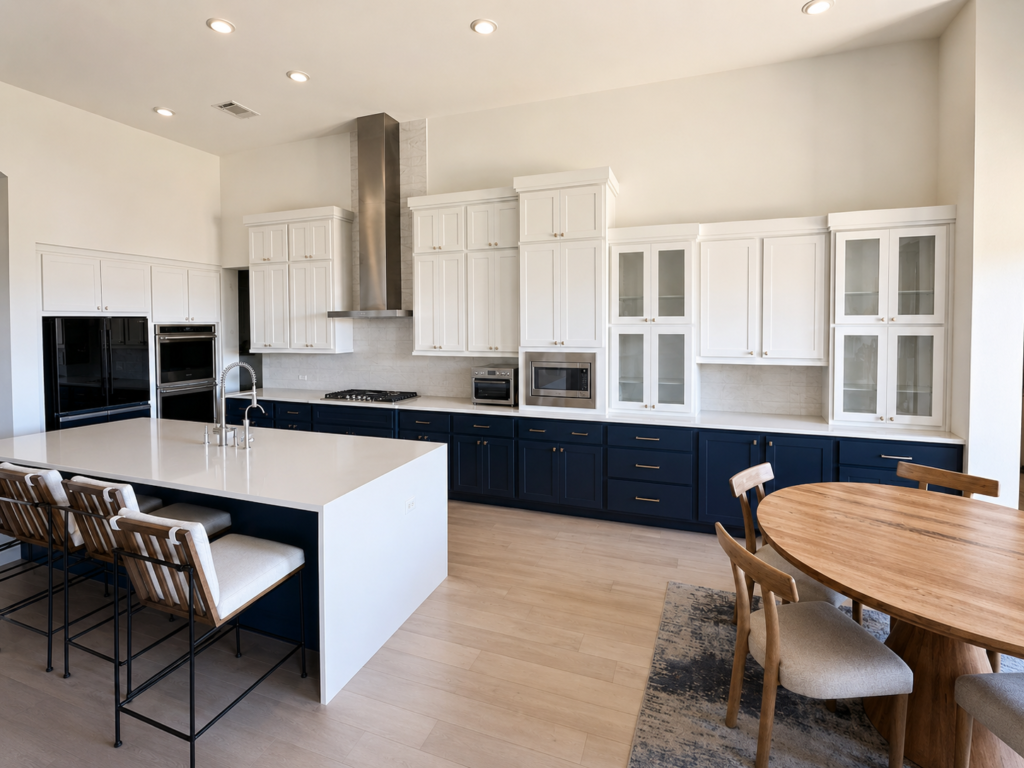
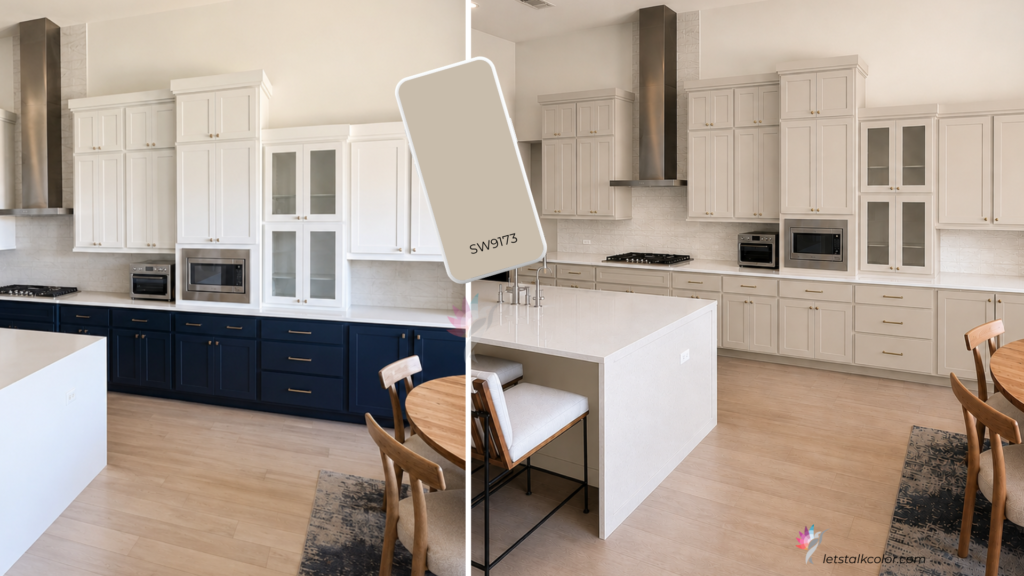
We worked through a few neutrals and landed on Sherwin-Williams Shiitake (SW 9173) — a soft taupe that would work well with their current flooring (in person, not on the picture), create a deeper contrast, and better complement the room without competing with the surrounding finishes.
One comment they made really stood out to me. They said they would have to “get used to it mentally.” I hear that more often than you might think!
One of the most important parts of my job isn’t simply choosing paint colors—it’s helping homeowners prepare for change. I may see a room for the first time, but my clients have often lived with it every day for many years. Even a beautiful update can feel unfamiliar and unsettling at first.
That’s one of the reasons I find AI renderings so valuable. They give homeowners the opportunity to visualize a significant change before making the investment. Instead of trying to imagine the finished result, they can see it, process it, and become comfortable with the new direction before the first cabinet door is ever painted.
The kitchen below shows how a single paint change can completely alter the look of a room without changing the architecture.
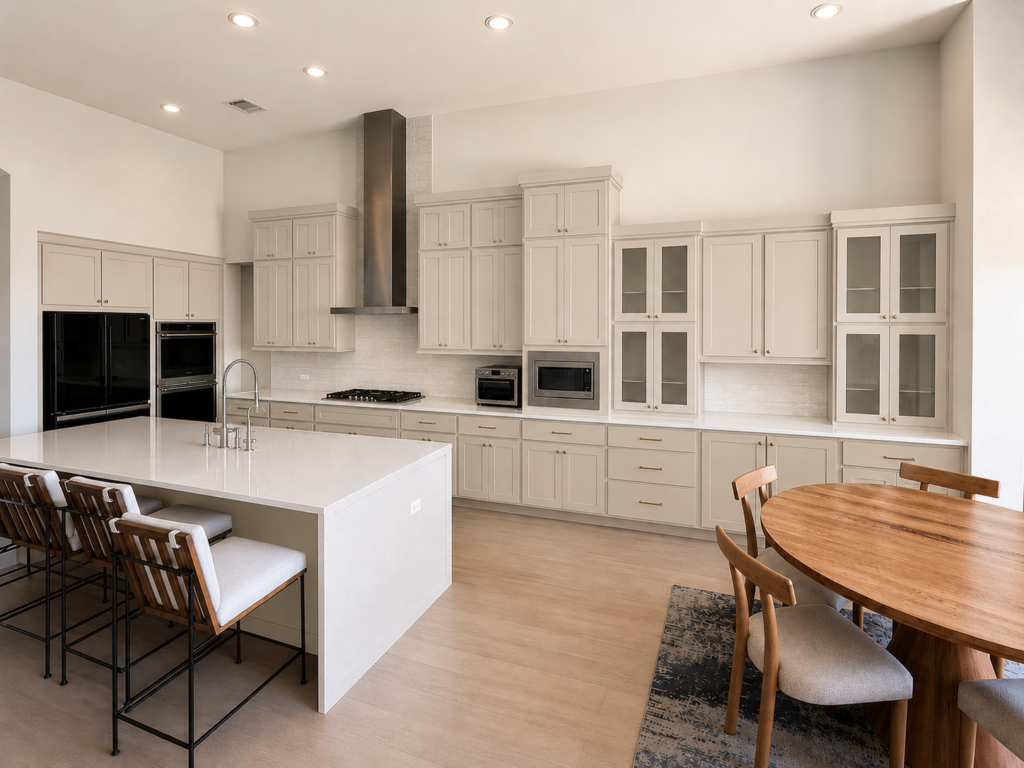
For this example, I asked the AI to repaint only the cabinetry using Sherwin-Williams Shiitake (SW 9173) and included its digital color reference, Hex #B8AEA1. The goal wasn’t to redesign the kitchen—it was simply to visualize how one color choice would influence the overall space.
A successful prompt tells the AI exactly what should change and, just as importantly, what should stay the same. In this case, the layout, countertops, backsplash, flooring, lighting, hardware, appliances, furniture, and camera angle all remained untouched. Only the cabinet color changed.
Example AI Prompt
Use this exact kitchen image as the reference.
> Do not change the layout, architecture, lighting, countertops, backsplash, flooring, hardware, appliances, furniture, walls, ceiling, or camera angle.
> Paint the cabinets #B8AEA1
> Maintain realistic paint coverage, natural shadows, reflections, and material textures so the result appears as a professionally photographed kitchen.
Why Include the Hex Code?
Most AI image generators do not consistently recognize paint color names by themselves. Including the paint manufacturer, color name, paint number, and hex code gives the AI a much clearer digital target. The remaining instructions tell the AI what should change and, just as importantly, what should remain untouched.
Where Should You Find a Paint Hex Code?
Start with the paint manufacturer whenever possible.
Sherwin-Williams, for example, provides downloadable color information that includes official color names, numbers, RGB values and hex references. (Sherwin-Williams) See screenshot below
When researching a color:
- Confirm the paint name and number.
- Look for information supplied by the manufacturer.
- Compare more than one reputable source when necessary.
- Label the hex code as a digital reference, not an exact paint match.
Do not use a color-picker tool on a Pinterest photograph and assume it has identified the original paint color.
That tool is identifying one pixel in one photograph. The pixel has already been influenced by lighting, shadows, camera settings, editing and the screen on which you are viewing it.
It may be a useful visual reference. It is not necessarily the paint color that was used in the room.

What AI Renderings Do Well
· Explore overall color direction.
· Compare light versus dark options.
· Evaluate color placement.
· Visualize contrast between cabinetry, walls, and trim.
· Communicate a design concept before making an investment.
What AI Renderings Cannot Do
· Predict the exact paint color in your home.
· Show subtle differences between similar neutrals.
· Replicate changing natural light throughout the day.
· Accurately predict how paint will react beside your actual flooring, countertops, or cabinetry.
· Replace testing with real paint samples.
The Bottom Line
A paint hex code is a digital reference—not a paint formula. It helps AI create a realistic visualization, but it cannot guarantee how a color will look once it is applied to your walls or cabinets. Use AI to explore ideas, compare options, and communicate your vision. Then verify your final choice with a large physical paint sample viewed in your own lighting. The rendering helps you see the direction. The room makes the final decision.
Continue reading the Neutral Paint Color Series to better understand how neutral colors behave in real homes:
Hue Family vs. Undertone: What Paint Color Labels Actually Mean
Warm White Paint Colors Compared
Modern Beige Paint Colors Compared
Why Neutral Paint Turns Gray Beside Warm Wood Floors
How to Narrow a Neutral Paint Shortlist Without Sampling 25 Colors
Ready to take the next step?
You can book an appointment with me for personalized support or schedule a discovery call if you’d like to explore how I can help.
Enjoy this blog?





5 Responses